Understanding What Really Happens During git push
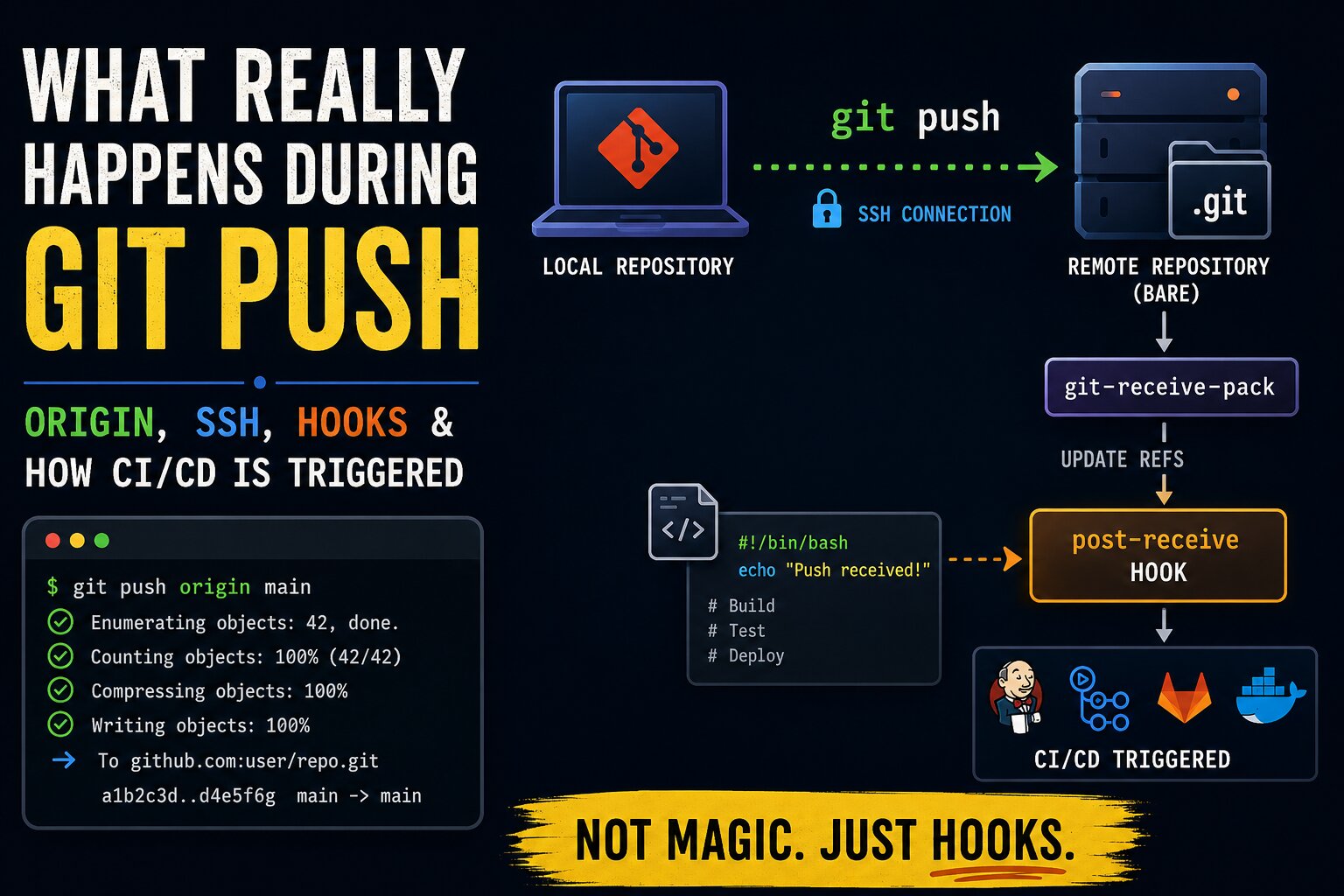
Git is often used through a small set of familiar commands:
git add .
git commit -m "message"
git push origin main
The commands become muscle memory very quickly, but the underlying mechanics are usually hidden behind abstractions.
Let’s progressively explore how Git remotes, SSH transport, bare repositories, hooks, and CI/CD systems work internally.
origin Is Just a Remote Name
One common misconception is treating origin as a special Git feature or server type.
It is neither.
origin is simply the default name assigned to a remote repository.
When the command:
git clone [email protected]:user/project.gitis executed, Git automatically creates a remote named:
originThe configured remotes can be viewed using:
git remote -vExample:
origin  [email protected]:user/project.git (fetch)
origin  [email protected]:user/project.git (push)
The word origin itself has no special meaning beyond being a convenient label.
It can even be renamed:
git remote rename origin upstream-serverAfter renaming:
git push upstream-server mainworks exactly the same way.
Any Git Repository Can Act as a Remote
Git is fundamentally a distributed version control system.
Every repository contains the Git database and history.
Because of this, any Git repository can become a remote repository for another repository.
Example:
mkdir project
cd project

git init
This creates a valid Git repository.
Another repository can use it as a remote:
git remote add origin /path/to/projector over SSH:
git remote add origin ssh://server/path/to/projectThis is one of Git’s most important architectural properties:
Git repositories are peers capable of communicating with each other.
Platforms like GitHub and GitLab are built on top of this model.
Normal repositories and bare repositories
Git repositories can be of two Types. Understanding the difference between normal repositories and bare repositories is critical.
1. Normal Repository
A typical local repository looks like this:
myproject/
├── app.py
├── README.md
└── .git/
The working files are visible.
The actual Git metadata and object database live inside:
.git/2. Bare Repository
A bare repository usually looks like this:
project.git/
├── HEAD
├── objects/
├── refs/
├── hooks/
Notice something important:
There are no checked-out source files.
No working directory exists.
The repository itself consists only of Git internals.
This is why bare repositories are commonly named using the .git suffix:
project.gitThe suffix is convention, not requirement.
Why Servers Use Bare Repositories
Remote Git servers generally use bare repositories because they avoid problems caused by working directories.
A normal repository introduces issues such as:
- checked-out branch state
- accidental file modifications
- overwritten working files
- inconsistent workspace state
Bare repositories avoid these entirely.
They are designed specifically for sharing and synchronization.
What Actually Happens During git push
When the command:
git push origin mainis executed, Git performs several operations internally.
At a high level:
- Git connects to the remote repository
- It determines which objects are missing remotely
- Missing objects are transferred
- Remote references are updated
However, the transport and server-side mechanics are far more interesting.
SSH and HTTPS Are Just Transport Mechanisms
The transport protocol depends entirely on the remote URL.
HTTPS Example
https://github.com/user/project.gituses HTTPS.
SSH Example
[email protected]:user/project.gituses SSH.
Important Detail: Git Does Not Implement SSH
Git itself does not implement SSH encryption or authentication.
Instead, Git invokes the system SSH client underneath.
Conceptually:
Git
  ↓
SSH connection established
  ↓
Git protocol data transmitted securely
When git push is executed over SSH, Git objects travel through the encrypted SSH connection from one machine to another.
The Process That Actually Handles Pushes
One of the most important internal components involved in pushing is:
git-receive-packWhen a push occurs over SSH, the remote server typically launches this process automatically.
This process:
- receives Git objects
- validates references
- updates branches
- triggers hooks
This is the exact point where the server becomes aware that a push has happened.
No polling is required.
The push-handling process itself is directly performing the update.
Git Hooks: The Foundation of Automation
Inside Git repositories exists a special directory:
hooks/Example:
project.git/hooks/Git automatically executes scripts inside this directory when specific events occur.
Important hooks include:
pre-receive
update
post-receive
These hooks form the foundation of most Git-driven automation systems.
The post-receive Hook
The most important hook for CI/CD-style workflows is:
post-receiveAfter a successful push, Git automatically executes:
hooks/post-receiveThis is simply an executable script.
It can be written in:
- Bash
- Python
- Go
- Node.js
- or any executable language
This is the mechanism through which builds, deployments, notifications, and CI/CD workflows are commonly triggered.
A Small Experiment With Git Hooks
The following experiment demonstrates how pushes can trigger automation directly.
Step 1 — Create a Bare Repository
mkdir repos
cd repos

git init --bare project.git
This creates:
repos/project.git/Step 2 — Add a Hook
Create:
repos/project.git/hooks/post-receiveContents:
#!/bin/bash

echo "Push received!"

while read oldrev newrev ref
do
    echo "Reference updated:"
    echo "$ref"
    echo "$oldrev -> $newrev"
done
Make it executable:
chmod +x repos/project.git/hooks/post-receiveStep 3 — Clone the Repository
git clone /path/to/repos/project.git demo
cd demo
Step 4 — Commit and Push
echo "hello" > hello.txt

git add .
git commit -m "test"

git push origin main
What Happens Internally
The flow is roughly:
git push
    ↓
SSH/local transport starts
    ↓
git-receive-pack executes
    ↓
refs are updated
    ↓
post-receive hook executes
The hook immediately prints:
Push received!
refs/heads/main
oldhash -> newhash
This demonstrates an important idea:
Git repositories do not need to be polled continuously to detect changes.
The server-side push-handling process already knows exactly when references are updated.
How Jenkins and GitHub Actions Relate to This
At a conceptual level, CI/CD systems are built around this same event-driven idea.
A push occurs.
An event is generated.
Automation is triggered.
Even modern CI systems eventually execute shell commands internally.
Example:
steps:
  - run: npm test
  - run: docker build .
Underneath the abstractions, commands are still being executed on machines.
Why Dedicated CI/CD Platforms Exist
Simple hooks and scripts work extremely well for small setups.
However, larger systems introduce operational challenges such as:
- concurrent builds
- isolated environments
- distributed workers
- secrets management
- retry handling
- artifact storage
- permission systems
- web dashboards
- container orchestration
- caching
- scalability
For example, if multiple pushes trigger builds simultaneously:
Push A → build starts
Push B → build starts
shared directories can interfere with each other.
Modern CI systems solve this using:
- containers
- virtual machines
- isolated runners
- job queues
The shell script approach gradually evolves into a platform.
The Core Mental Model
A useful mental model is:
Git:
    stores history
    transfers objects
    updates refs
    executes hooks

Hooks:
    trigger external automation

CI/CD systems:
    orchestration layers around automated execution
This explains why tools like Jenkins, GitHub Actions, and GitLab CI feel sophisticated while still fundamentally depending on simple executable workflows underneath.
Final Thoughts
The command:
git pushoften appears deceptively simple.
Internally, however, it involves:
- transport protocols
- object synchronization
- server-side Git processes
- reference updates
- executable hooks
- event-driven automation
Once these pieces become clear, Git hosting platforms and CI/CD systems stop feeling magical.
They become understandable systems built on composable primitives.